- Published on
- 9 min read·… views
COUNT(*) vs COUNT(1): Which One Performs Best?
Hi everyone 👋. I'm Hung Anh.
When we count rows in a table, we're used to reaching for the count function, but the count function accepts several kinds of arguments, such as count(1), count(*), count(field), …
So which one is the most efficient? Is count(*) really the least efficient?
People often assume count(*) is the least efficient, believing it reads every column in the table, just like a select * from query. Is that actually true? Let's find out below.
Table of Contents
1. Which count statement performs best?
Let's start with the conclusion:
count(*) = count(1) > count(primary key field) > count(field)
To understand why, we need to dig into how the count() function actually works. Before we go further, let's agree on the context for this article:
- Database: MySQL
- Store engine: InnoDB
1.1. What is Count()?
Count(arg) is an aggregate function used to count the number of rows in a query result set where the argument arg is not NULL.
The argument arg can take the following forms:
- A constant: count(0), count(1), ...
- An expression: count(1 < 2), ...
- A column: count(name), count(age), ...
- "*": count(*)
Suppose arg is a column such as name:
select count(name) from member;
This statement counts the number of rows in the member table where the name column is not NULL. In other words, if the name column of a row is NULL, that row is not counted.
Suppose arg is the constant 1:
select count(1) from member;
This statement counts how many rows in the member table satisfy "1 is not NULL". Of course 1 is always not NULL, so this statement is effectively counting how many rows there are in the member table.
To make this clearer, let's now look at how the count function works internally and at its execution strategies.
1.2. How does Count(primary key field) execute?
When we count the number of rows via count(arg), MySQL maintains a variable called count and iterates over the rows in the query result set. If the value of arg is not NULL, it adds 1 to the count variable. Once all rows have been scanned, it returns the count variable to the client.
As we know, there are two kinds of index: the clustered index and the secondary index. The difference is that the leaf nodes of the clustered index store the actual row data, whereas the leaf nodes of the secondary index store only the primary key value instead of the full row data.
Take the following query as an example:
select count(CardNo) from member;
If the table only has a clustered index, InnoDB scans the clustered index and returns the rows it reads. InnoDB then reads the value of the CardNo column in each row to determine whether CardNo is NULL, and if it is not NULL, the count variable is incremented by 1.

However, if there is a secondary index on the table, InnoDB will prefer to scan the secondary index instead of the clustered index.

The reason is that a secondary index takes up less storage space than the clustered index ➔ the secondary index tree is smaller than the clustered index tree ➔ the I/O cost of scanning the secondary index is lower than scanning the clustered index. That's why the secondary index is preferred.
1.3. How does Count(1) execute?
The argument to count here is 1, which is clearly neither a column nor NULL. So how does count(1) execute?
Take the following query as an example:
select count(1) from member;
When there is only a clustered index and no secondary index, InnoDB scans the clustered index to produce the query result set. Since the constant 1 is always not NULL, InnoDB simply scans and returns the number of rows without having to inspect the value of any column in the result set.

When a secondary index exists, InnoDB still prefers to scan the secondary index instead of the clustered index.

As we can see, count(1) is faster than count(primary key field), because it doesn't need to read the row to check the argument for NULL. That's why people often say count(1) executes slightly more efficiently than count(primary key field).
1.4. How does Count(*) execute?
When you see the * character, do you assume it's reading every column value in the row?
That's true for select *, but not for count(*). When we call count(*), MySQL converts the argument to count(0).
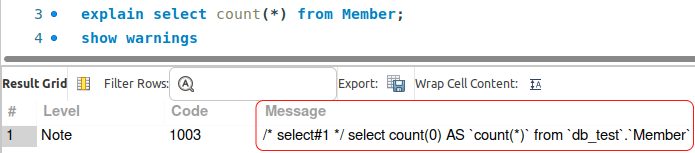
As a result, count(*) executes exactly like count(1) with no difference in performance.
1.5. How does Count(field) execute?
Count(field) has the worst execution efficiency compared to count(1), count(*), and count(primary key field).
Consider the following example:
select count(name) from member;
For this query, MySQL scans the entire table to do the counting, so its execution efficiency is relatively poor.

If field happens to be a secondary index, the statement will scan that index instead, which improves performance.
1.6. Summary
- count(*) = count(1) > count(primary key field) > count(field)
- If the table has a secondary index, InnoDB will pick the secondary index with the smallest key_len to scan, because it is more efficient than scanning the primary index.
- Avoid count(field) since it is the least efficient. When you do need it, create a secondary index on the field column to improve query performance.
2. Why does count have to scan the rows?
You might wonder why the count() function needs to scan the rows at all.
From the start of this article, I've only referred to the InnoDB storage engine, but different storage engines may execute the count function differently. Take MyISAM, another MySQL storage engine and the second most popular one after InnoDB.
With MyISAM, each table keeps metadata that holds a row_count value. So when you need to count all the rows in a table (count() with no filter condition), MyISAM only has to read the row_count value, with O(1) complexity.
When the count includes a where filter, MyISAM is no different from InnoDB: both have to scan the table to count the rows.
Note that when reading the row_count value, MyISAM locks the table to guarantee the consistency of this value.
The InnoDB storage engine supports transactions, and multiple transactions can run at the same time. The MVCC (multi-version concurrency control) mechanism and isolation can affect the result of count(), so the count result in InnoDB is also not deterministic, which means it cannot maintain a single row_count variable like MyISAM does.
For example: the member table has 100 rows, and there are 2 sessions running in parallel, with the queries executed in the following order:
| Session A | Session B |
|---|---|
| Begin | Begin |
| select count(*) from Member (return 100) | |
| insert into member ... | |
| select count(*) from Member (return 100) | select count(*) from Member (return 101) |
At the end of sessions A and B, we check the total number of rows in the member table at the same time, yet you can see the results differ. Because the default isolation level of transaction A is repeatable read, count(*) in session A keeps returning 100. That's why InnoDB has to scan the table when counting and cannot maintain a single row_count variable like MyISAM.
3. How can we optimize count(*)?
If you frequently run count(*) on a large table, that's not a good approach. The member table has more than 12 million rows in total, and I've also created a secondary index, but it still takes about 5 seconds to execute once: select count(*) from member
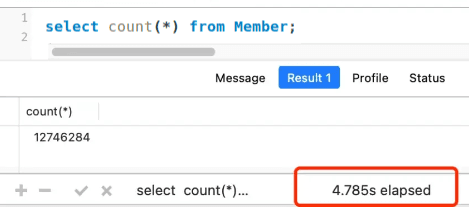
So is there a better way to do this when facing a large table?
3.1. Use an approximate value
If you don't need the count to be exact, for example when a search engine returns the number of results for a keyword, that number is an approximate value.

In this case, we can use the explain command to estimate the table size. The explain command (without the analyze option) is very efficient because it doesn't actually run the query.
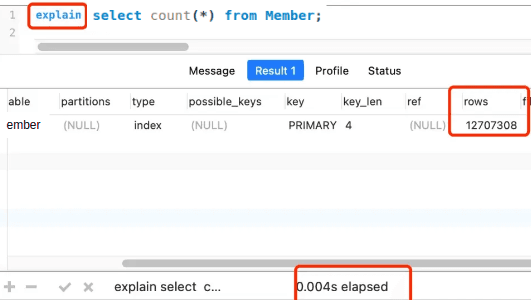
3.2. Create a table to store the count value
If we want to get the exact total number of rows in a table, we can store this count in a separate counter table. When a row is inserted into the data table, we increment the count column by 1, and when a row is deleted, we decrement the count column by 1.
4. Conclusion
Finally, here are a few key points to remember:
- count(*) performs better than count(pk) and count(field)
- The count function prefers to use a secondary index to do the counting.
- When you don't need an exact figure, use an approximate value.
Thank you for reading my article. It still has plenty of gaps, as my own knowledge is still limited. I hope this article gives you a better understanding of how to use the various count functions when working with databases.
See you in the upcoming articles.
Happy reading! 🍻