- Published on
- 16 min read·0 views
Understanding Indexes in Relational Databases
Hi everyone 👋. I'm Hung Anh.
When working with relational database management systems such as MySQL, PostgreSQL, and others, using indexes to speed up data queries is essential. For those who are just getting started, however, learning about indexes can be quite challenging. I've been through those tough moments myself. Today, let's explore the topic of indexes together so you can gain a clearer understanding of it!
What is an index?

When we read a book and want to quickly jump to chapter X, we typically use the table of contents to find the page number of that chapter. This saves us from having to flip through every page to reach the one we want. The trade-off is that a few pages at the front of the book are taken up by the table of contents.
Indexes in a DBMS work in much the same way. An index is simply a data structure stored on disk, and its purpose is to make querying data from the database faster by reducing the number of records that need to be scanned.
Before getting into the details, let me set the context for this article:
- DBMS: MySQL
- Storage engine: InnoDB
Types of indexes
Indexes can be classified according to the following criteria:
- By data structure:
- B+ Tree index
- Hash index
- FullText (inverted) index
- LMS tree
- By physical storage:
- Clustered index
- Non-clustered index (Secondary index)
- By number of columns
- Single column index
- Composite index
- By property
- Primary key index
- Unique index
- Prefix index
One thing to note here: when someone asks how many types of indexes there are, I have to ask them in return which criteria they want to classify by. By default, if nothing else is specified, I assume they mean classification by data structure.
In the sections below, let's explore some of the most commonly used types of indexes.
By data structure
B+ Tree Index
Whenever we create an index on the columns of a table, the DBMS builds a B+ Tree data structure based on the data in those columns.
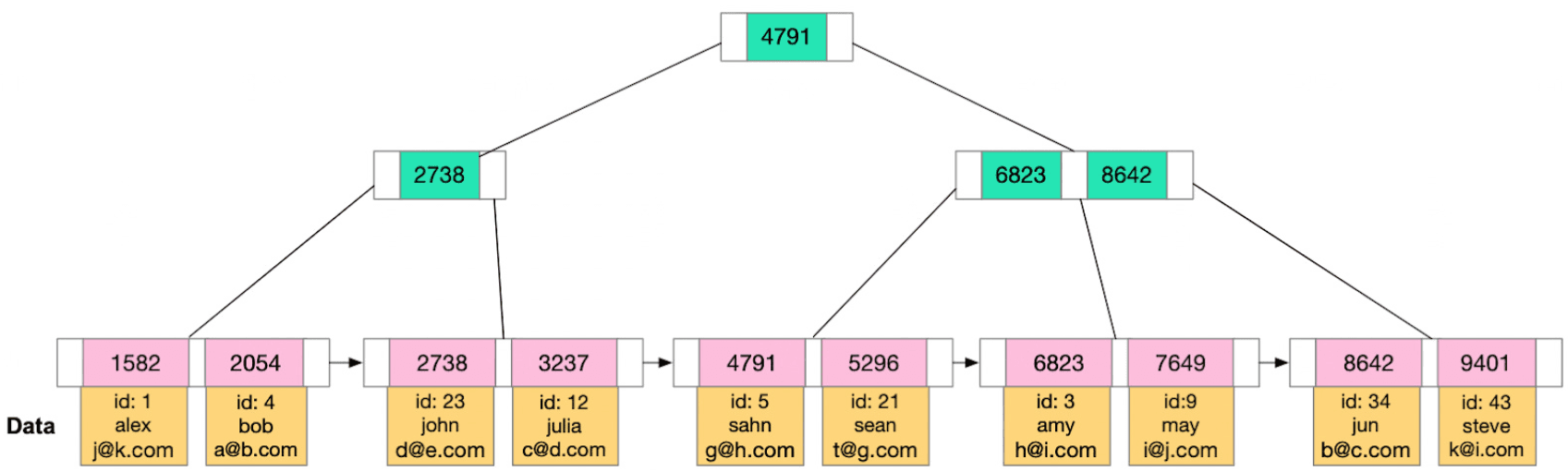
A B+ Tree data structure has the following characteristics:
- Each internal node holds multiple keys
- Reduces the height of the tree
- Reduces the number of node reads from disk
- The leaf nodes are linked together in a linked list
- More efficient for range queries (we only need to find the first leaf node that satisfies the condition and then traverse to the next leaf nodes until we reach the last one that satisfies the condition).
- The leaf nodes contain pointers to the actual records
Hash Index
When we use a hash index on the columns of a table, the DBMS uses a hash function to hash the data in that column and map it to the specific addresses of the records.
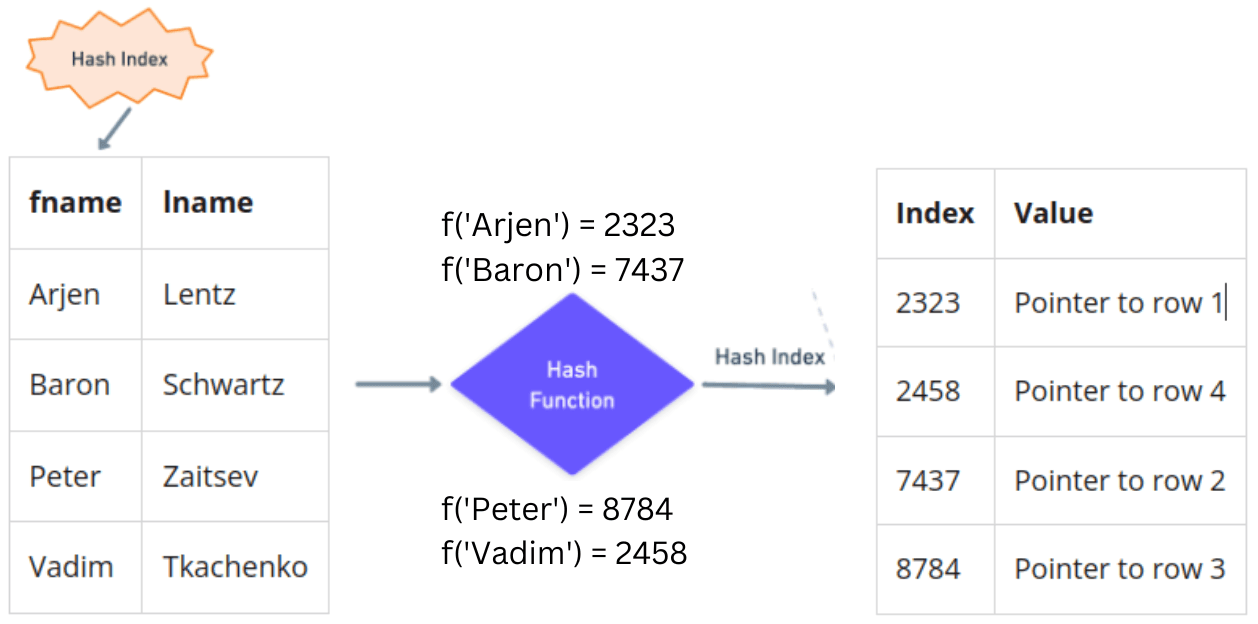
Advantages:
- Well suited for equality ("=") comparison queries
- Requires less memory to implement than a B+ Tree
Disadvantages:
- Not suitable for range queries or sorting
- Collisions can occur when two different values produce the same hash result
By physical storage
Clustered index
A clustered index defines how data is physically stored in a table.
In simple terms, when a column has a clustered index, all rows are organized and stored in a single data structure (usually a B+ Tree), with the following characteristics:
- The internal nodes store only the value of the indexed column.
- The leaf nodes store the actual data of the records
So when a column has a clustered index, that index determines that the column's value lives in the internal nodes, while the leaf nodes hold the actual record data.
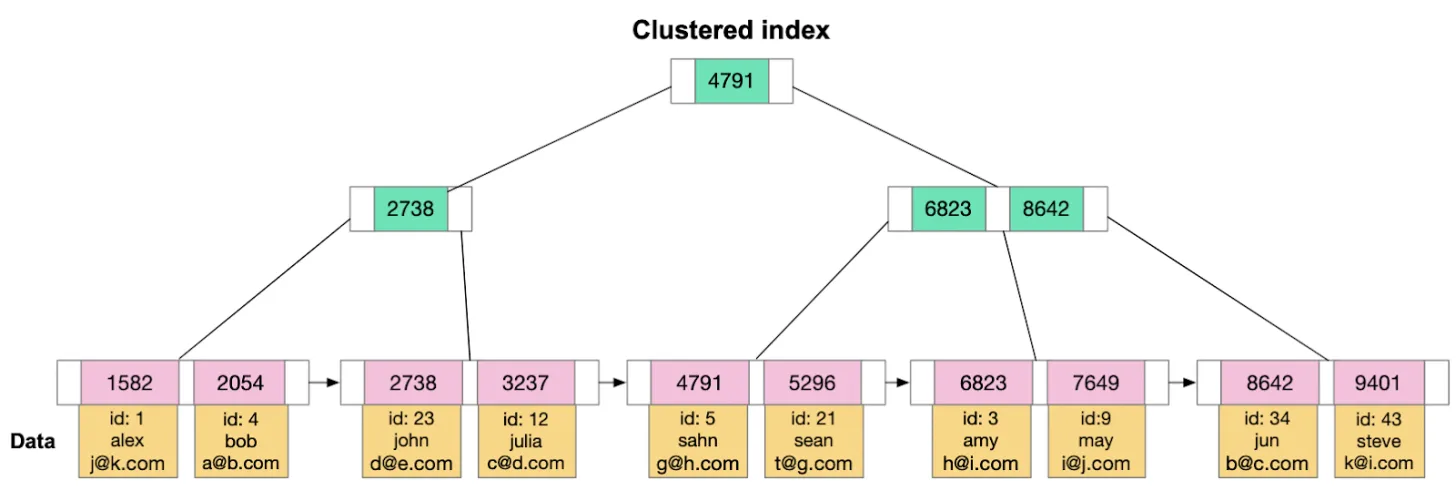
A table has exactly one clustered index. By default, the InnoDB engine automatically creates a clustered index according to the following rules:
- If there is a primary key column ➔ Create the clustered index on the primary key column
- If there is no primary key ➔ Use a unique, not-null column for the clustered index
- If there is no unique, not-null column ➔ The InnoDB engine automatically creates 3 hidden columns (DB_ROW_ID, DB_TRX_ID, DB_ROLL_PTR) to serve as the primary key and builds the clustered index on it.
Non-clustered index
Any index that is not a clustered index is a non-clustered (secondary) index.
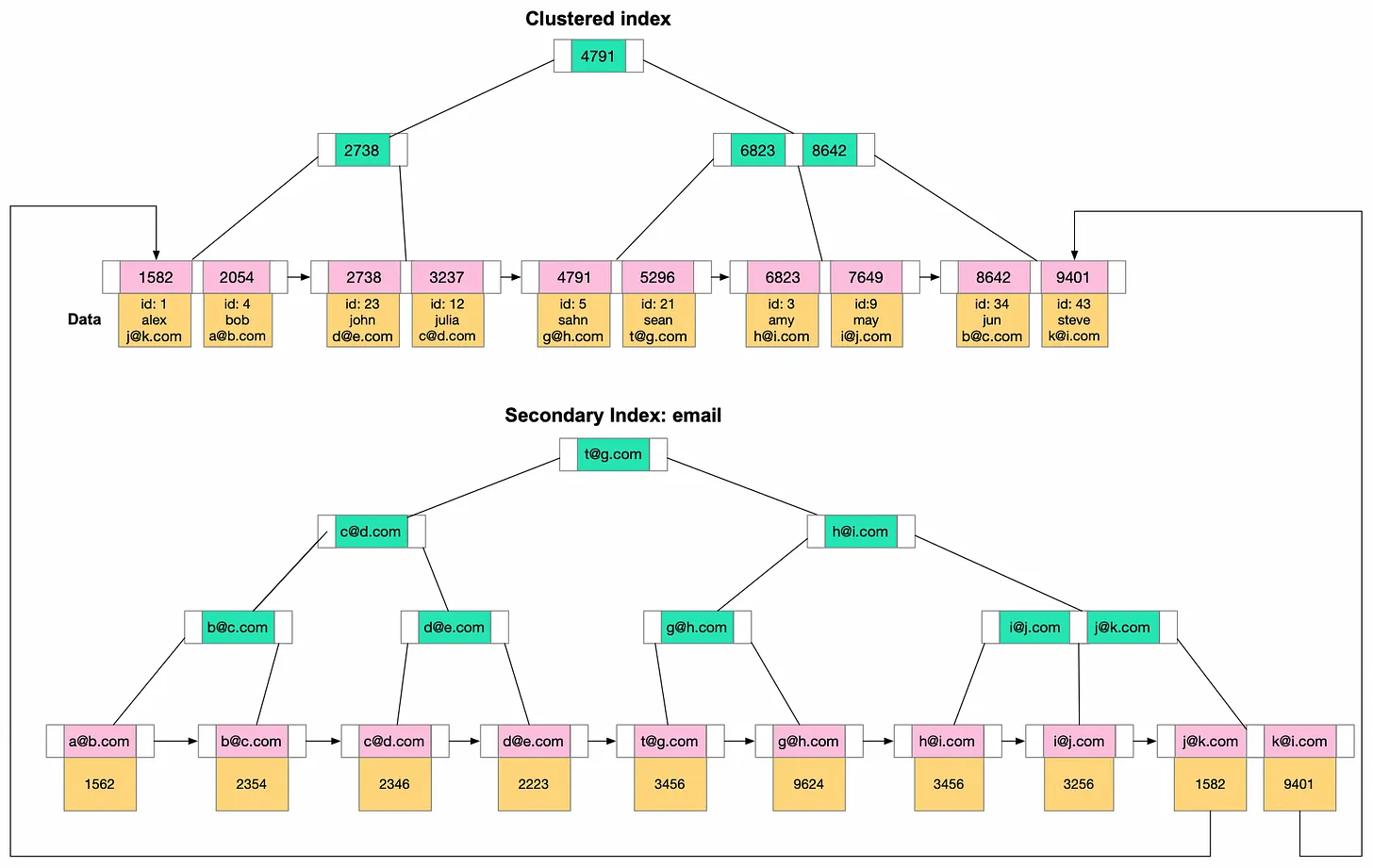
A non-clustered (secondary) index has the following characteristics:
- The value of a leaf node is the value of the column indexed by the clustered index.
- A table can have multiple non-clustered indexes.
From the illustration above, suppose the clustered index is built on the primary key column and the non-clustered index is built on the email column. When we run the statement below:
SELECT * FROM table WHERE email = 'eamil_search';
InnoDB searches the B+ Tree of the email column, and once it finds the matching leaf node, it takes the value of that leaf node (which is the key of the clustered index tree) and scans the B+ Tree of the clustered index to return the full result of the query.
Hmm, at this point you might be wondering:
Why doesn't the non-clustered index store the record's data, or the record's memory address, inside the leaf node so we can avoid traversing two trees?
I think InnoDB chooses not to do this for a couple of reasons:
- Record data can change ➔ This would require updating the data in the leaf nodes of every non-clustered index tree.
- The record's memory address can also change ➔ This would require updating the memory address in the leaf nodes of every non-clustered index tree.
Both approaches would be very time-consuming. With the current model, whenever data changes, InnoDB only needs to update the data in the clustered index tree.
Disadvantages of non-clustered indexes:
- Write operations become slower (when adding or modifying data in an indexed column, the B+ Trees must be updated).
- The more non-clustered indexes there are, the more storage space is consumed (multiple B+ Trees have to be built and stored).
- Creating and maintaining indexes takes time.
- Two tree traversals are required (increasing disk I/O time).
By property
Before getting into this section, let me clarify the concepts of key and index.
What's the difference between a key and an index?
Although the terms key and index are often used interchangeably, the ideas behind them are different:
- Key: A constraint imposed on the behavior of a column. For example, a primary key is a field that cannot be empty and uniquely identifies each row.
- Index: A special data structure that makes lookups faster; there is no notion of a constraint here.
Primary Index
A primary index is a type of index that acts as a unique identifier for each row in the table.
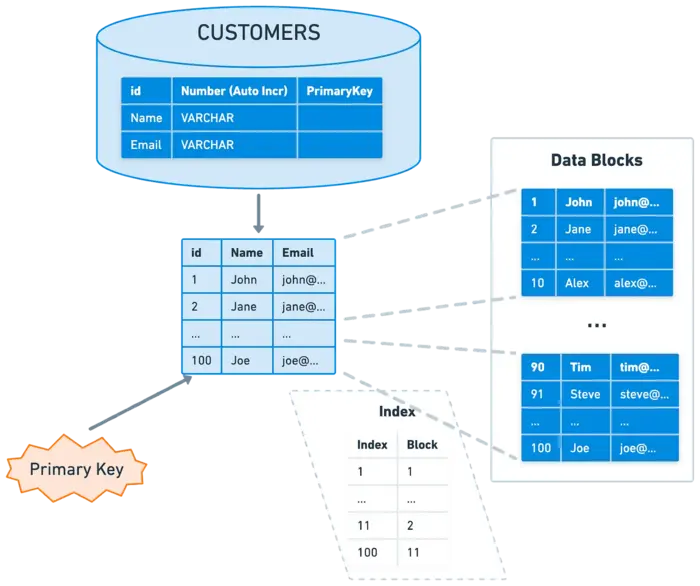
When we create a primary key, the InnoDB engine also creates a corresponding primary index. A primary index does not allow null values.
The ideal primary key is of type INT or BIGINT, simply because comparing integers is faster, which makes index traversal faster and, in turn, write operations faster as well. Of course, an integer primary key also has some drawbacks; for example, from a security standpoint, an attacker can easily guess the next id values. Depending on your situation, choose the type that best fits your primary key.
Unique Index
A unique index is a data structure that guarantees the value of a column (or columns) in a table is unique, meaning there are no duplicate values, though null values are allowed.
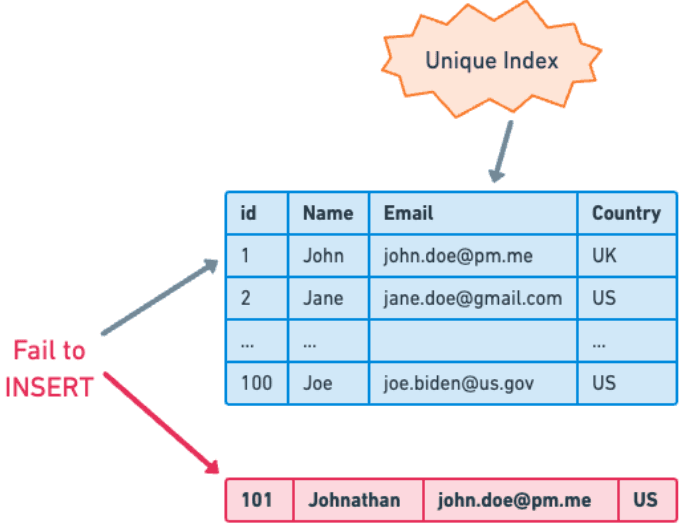
To create a unique index, use the following syntax:
CREATE UNIQUE INDEX index_name ON table_name(index_column_1,index_column_2,...);
By number of columns
Composite Index
A composite index is an index built on multiple columns. The more columns a composite index has, the more storage space it uses.
To make this easier to understand, here's an example: suppose I create a composite index on the two columns name and country, as shown below.
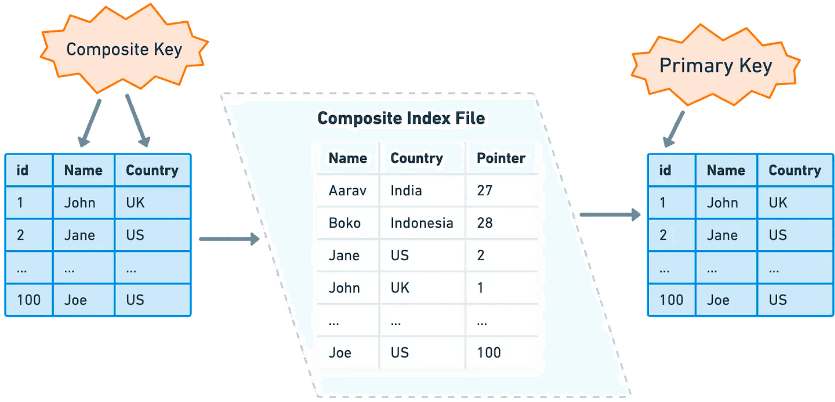
The InnoDB engine builds B+ Trees consisting of the clustered index tree, the tree for the name column, and the trees for the country column.
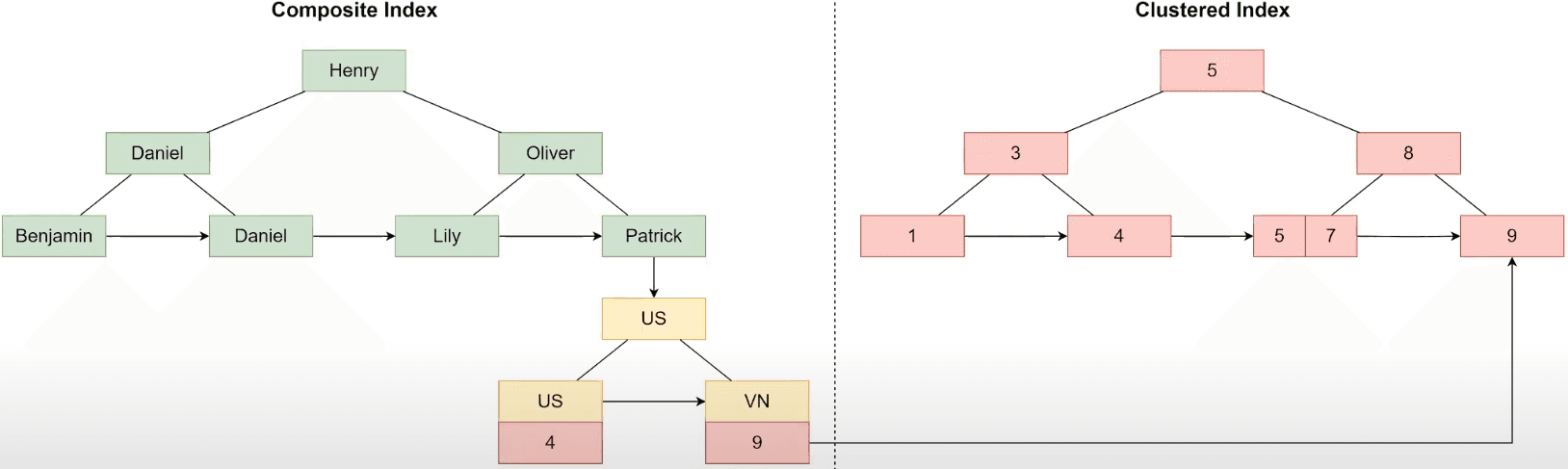
The leaf nodes of the name tree point to the corresponding root nodes of the country tree, and the leaf nodes of the country tree contain the clustered index key value. Once we finish traversing the composite index tree, we have the clustered index key value, and only then do we traverse the clustered index tree to retrieve the queried data.
At this point, here's a little exercise. Suppose I have a composite index built on three columns (country, provine, name). Which of the queries below do you think will use the index?
SELECT * FROM customers WHERE provine = ‘Texas’ AND country = ‘US’;
SELECT * FROM customers WHERE provine = ‘Texas’;
SELECT * FROM customers WHERE name = ‘JANE’ AND provine = ‘Texas’;
SELECT * FROM customers WHERE country = ‘US’;
The answer is that queries number 1 and number 4 will use the index.
When we create a composite index on three columns (country, provine, name), the country tree is built first. The leaf nodes of the country tree point to the corresponding root nodes of the provine tree. The leaf nodes of the provine tree, in turn, point to the corresponding root nodes of the name tree.
Let's go through each query one by one.
Query number 1:
1. SELECT * FROM customers WHERE provine = ‘Texas’ AND country = ‘US’;
Query number 1 uses the index because the order of conditions in the WHERE clause can be rearranged; in other words, InnoDB automatically moves the country condition before the provine condition, turning it into (country = ‘US’ AND provine = ‘Texas’). As a result, InnoDB can still traverse the country tree first and then the provine tree to get the result.
Query number 2:
2. SELECT * FROM customers WHERE provine = ‘Texas’;
Query number 2 does not use the index because there is no filter on country, so InnoDB simply cannot traverse the index tree.
Query number 3:
3. SELECT * FROM customers WHERE name = ‘JANE’ AND provine = ‘Texas’;
Query number 3 also does not use the index, just like query number 2, because there is no filter on country. So InnoDB cannot traverse the index tree either.
Query number 4:
4. SELECT * FROM customers WHERE country = ‘US’;
Query number 4 uses the index because it filters on country. So InnoDB can traverse the country tree first. Since there are no filters on provine and name, it returns all the records.
From this we can conclude that:
The order of columns in a composite index matters.
So how do we determine the correct column order when using a composite index?
The approach is: place the column with the highest number of distinct values first.
Going back to the previous example, is the column order (country, provine, name) in the composite index actually optimal?
There are about 200 countries in the world. Each country has roughly 300 provinces. These are all finite numbers. But the name field can take an enormous variety of different values across the world. For this reason, we should reorder the columns to (name, provine, country) to optimize query performance.
Covering Index
A covering index is a composite index built on all the columns referenced in the select statement.
Suppose I have the following select statement:
SELECT FirstName, LastName FROM customers WHERE country = ‘US’;
If I build a composite index on all three columns (FirstName, LastName, country), this is called a Covering Index.
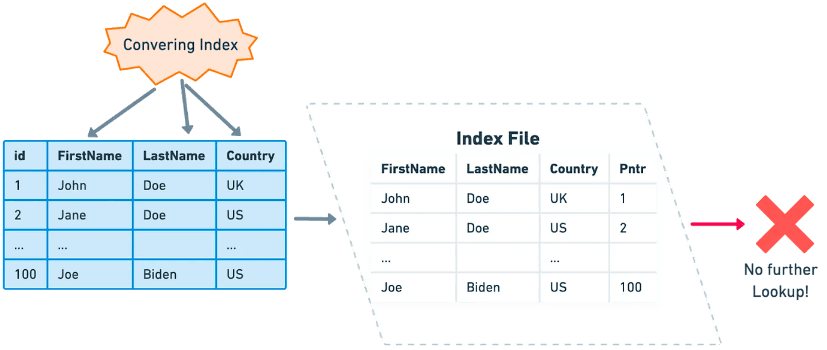
Since all the data needed for the query already resides in the nodes of these trees, once the DBMS finishes traversing the covering index tree, it no longer needs to reference the clustered index tree, which reduces tree traversal time and improves query performance.
For queries that involve few columns and are called frequently, we should take advantage of covering indexes. That said, we should limit the number of columns to 5. This is just a recommendation; depending on your actual situation, choose a number that makes sense.
Other types of indexes
- Classified by data structure
- Fulltext Index: Uses an inverted data structure, suitable for text search.
- Spatial Index: An index suited for spatial searches involving longitude, latitude, and radius.
- Bitmap Index: Suitable for problems involving intersections and unions of data.
How to use indexes
We shouldn't always use indexes. Indexes are a double-edged sword; if used carelessly, they can actually lead to slower queries. Below is a summary of some cases where you should and shouldn't use indexes.
You should use an index when:
- There are frequently used queries with WHERE, JOIN, GROUP BY, or ORDER BY.
- You need to find a small subset of records
- You search by columns with identifying or unique properties, such as product_id.
You should not use an index when:
- The column has a low number of distinct values. For example, gender (which has only two values, Male and Female).
- The table contains very few records.
Hands-on practice
Example 1
I've created an index on the name column. Which of the MySQL queries below do you think will use the index?
SELECT * FROM users WHERE name LIKE ‘%peter’;
SELECT * FROM users WHERE name LIKE ‘peter%’;
SELECT * FROM users WHERE name LIKE ‘%peter%’;
Answer: Query number 2 will use the index.
Explanation: For an indexed column of type varchar, the DBMS builds the index tree as a prefix. So when we query for ‘%peter’ or ‘%peter%’, the DBMS doesn't know where to start traversing.
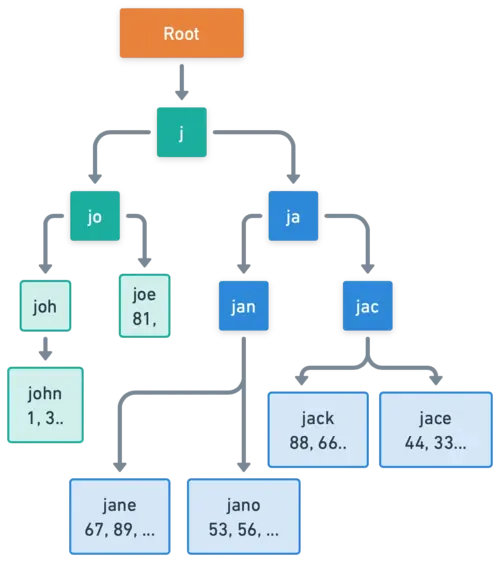
Note: In PostgreSQL, LIKE queries do not use the index, so in PostgreSQL none of the three queries above use the index.
Example 2
I've created an index on the id column. Do you think the query below uses the index?
SELECT * FROM users WHERE id = 1 OR age = 18;
Answer: The query above does not use the index.
Explanation: Since the age column is not indexed, the DBMS has to scan the rows in the table to check whether the age column equals 18.
Example 3
I've created an index on the id column, but in the first query the id column is of type int, while in the second query the id column is of type varchar. Do you think both queries below use the index?
SELECT * FROM users WHERE id = ‘10’; // Column ‘id’: int
SELECT * FROM users WHERE id = 10; // Column ‘id’: varchar
Answer: Query number 1 uses the index.
Explanation: Both queries above have a comparison condition where the two sides are of different data types. MySQL must convert them to the same type before it can compare them. MySQL prefers to convert the character type to the numeric type for comparison, since comparing two numbers is faster by default. The type conversion logic works as follows:
- If the column is numeric and the comparison value is a character type ➔ MySQL converts the character value to a number and then compares ➔ Convert '10' to 10 and then compare id = 10. ➔ Query number 1 uses the index.
- If the column is a character type and the comparison value is numeric ➔ MySQL converts each character value to a number and then compares ➔ Convert each row's character-type id to a number and then compare id = 10 ➔ Query number 2 does not use the index (since every row must be scanned to perform the conversion).
Example 4
I've created an index on the name column. Do you think the query below uses the index?
SELECT * FROM users WHERE length(name) = 20;
Answer: The query above does not use the index.
Explanation: Because I created the index on the name column, not on the value returned by the length(name) function, the query above does not use the index. That said, some DBMSs such as Oracle, PostgreSQL, and MySQL 8.0+ now support functional indexes, but we still need to be careful when using them.
Example 5
I've created an index on the id column. Which of the queries below do you think uses the index?
SELECT * FROM users WHERE id + 1 = 10;
SELECT * FROM users WHERE id + 0 = 10 - 1;
Answer: Neither of the queries above uses the index.
Explanation: Since I created the index on the id column, not on the value computed by an expression, neither of the queries above uses the index.
Best practices
Here are some best practices we should apply when using indexes.
- Limit the number of indexed columns.
- It's best to make the primary key auto-increment.
- Indexes work best on NOT NULL columns.
- Use a Covering Index whenever possible.
- This reduces tree traversal operations and minimizes disk I/O.
- If a column's data is very long, consider using a Prefix Index.
- This reduces the size of the index tree.
- Regularly monitor and optimize your indexes.
- Avoid index fields that are never used.
Conclusion
Well! We've finally reached the end of the article. Below is a summary of some of the key points.
- In a B+ Tree, the leaf nodes are linked together like a linked list ➔ more efficient for range queries.
- When traversing a non-clustered index, there are at least two tree traversals (two rounds of disk I/O): one traversal of the non-clustered index tree to retrieve the key, and one traversal of the clustered index tree to retrieve the record's actual value.
- Take advantage of composite indexes and covering indexes. We should place columns with a high number of distinct values first.
Thank you for reading my article. There are still many shortcomings due to the limits of my own knowledge. I hope this article gives you an overview of indexes in databases.
See you in upcoming articles.
Happy reading! 🍻
References
Related articles


Subscribe to the newsletter
Occasional notes on backend, infrastructure and systems design. No spam.