- Published on
- 8 min read·
Git Submodules: Embedding One Repo Inside Another
The first time I ran into a Git submodule, I didn't even know that's what it was.
I'd cloned a teammate's project, run the build, and watched it fail on a missing import. The folder was right there in the tree — libs/ui — but it was empty. Not missing. Empty. And git status showed it as a single greyed-out line, like Git knew about it but flat-out refused to fill it in.
That empty folder is the entire story of submodules in one screenshot. Once you understand why it's empty, everything else about submodules stops being mysterious. So let's start with the problem they solve, then build the mental model, then go through the commands.
The problem
You have a piece of code you want to share across several projects — a UI library, an internal config repo, a client SDK. You need every project to use it, but you also need each project to control which version it's on. Project A might be fine on the latest; project B might need to stay pinned to last month's commit because something downstream depends on it.
The usual workarounds all hurt:
- Copy the code into each project. Now a single bug fix means editing it in five places, and they quietly drift out of sync.
- Cram everything into one giant repo. Heavy, and often you don't even own the upstream code.
What you actually want is to keep that library in its own repository, but plug it into your project and freeze it to an exact version you choose.
The solution: a submodule
That's the gap a submodule fills. It lets you nest one Git repository inside another while the two stay completely independent.
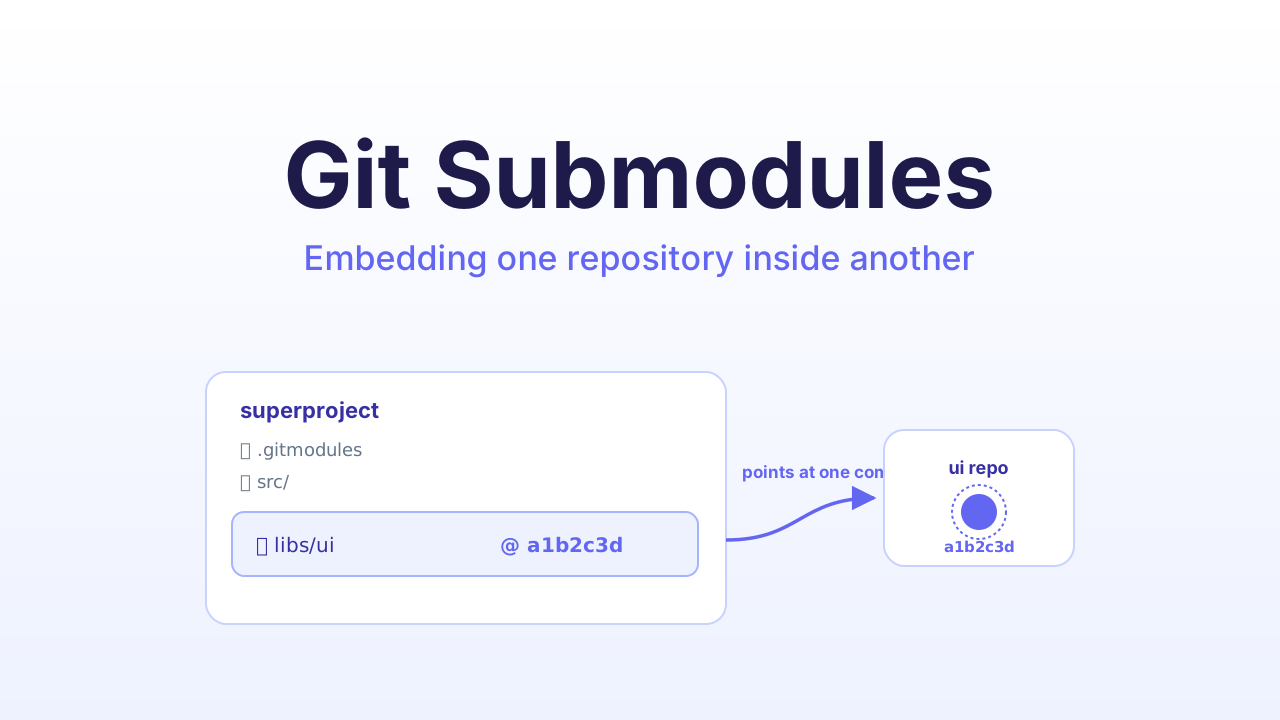
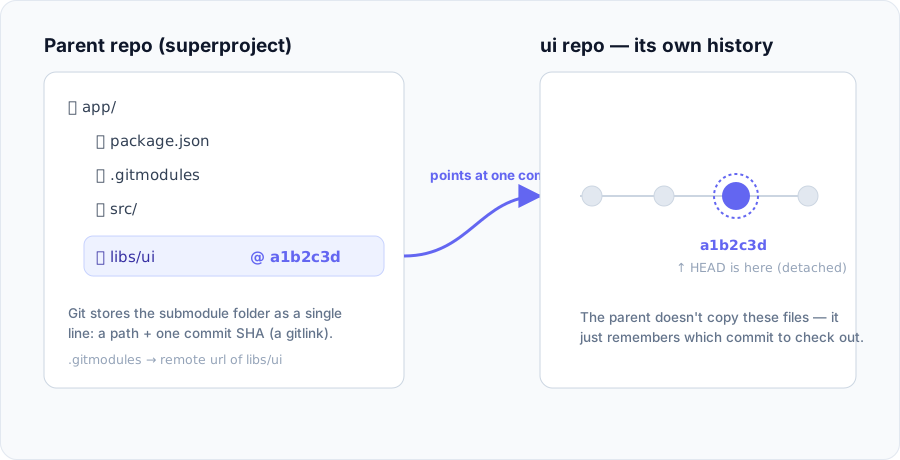
Here's the one sentence that makes everything else fall into place: the outer repo — the superproject — does not copy the inner repo. It stores a pointer to one exact commit of it.
That's why my libs/ui was empty. The clone had faithfully recorded "this folder should be the UI repo at commit a1b2c3d" — but it never fetched the actual files. The pointer was there; the content wasn't.
What's actually stored
When you add a submodule, Git writes two things into the superproject:
- A
.gitmodulesfile (committed) that maps each path to a remote URL. - A gitlink — a special entry in the tree that records the exact commit SHA the submodule should sit at.
NOTE
The superproject pins a commit, not a branch. So when you step into the submodule you'll find it in detached HEAD — pointing straight at a commit with no branch checked out. That looks alarming the first time, but it's exactly how submodules are meant to work.
How to use it
Adding one
# add a submodule at the path "libs/ui"
git submodule add https://github.com/acme/ui libs/ui
git status now shows two things to commit — .gitmodules and libs/ui (the gitlink). Commit both:
git add .gitmodules libs/ui
git commit -m "Add ui as a submodule"
Cloning a project that has one
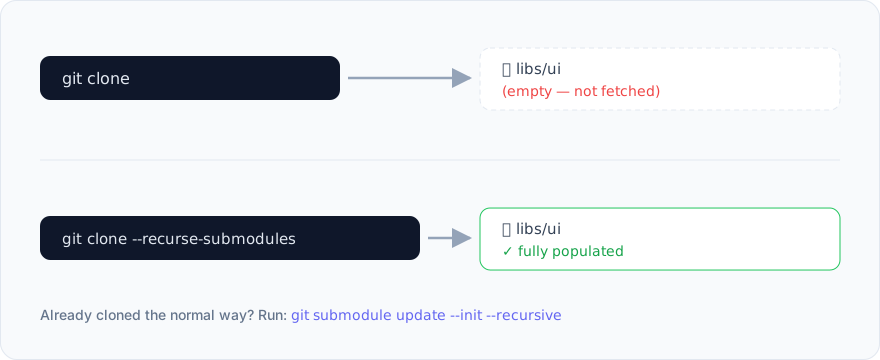
Back to my empty folder. A plain git clone records the pointer but leaves the folder empty — you have to fetch the contents yourself:
# clone and fetch every submodule in one shot
git clone --recurse-submodules https://github.com/acme/app

# already cloned the normal way? fill them in afterwards
git submodule update --init --recursive
Updating one
This is where most people get tangled, because there are two completely different things people call "updating," and they do opposite jobs.
1. Move the submodule to the commit the superproject expects. You do this after pulling a teammate's work — they bumped the pointer, and you need to catch up to it:
git pull
git submodule update --init --recursive
2. Bump the submodule to the latest commit on its own remote. This is you deciding to move forward:
git submodule update --remote libs/ui
The second one changes the gitlink, so the superproject now has a change to commit:
git add libs/ui
git commit -m "Bump ui to latest"
Editing code inside a submodule
A submodule is a full repo, so you can absolutely fix a bug right inside it. Just remember it starts in detached HEAD — check out a branch first, or your commit ends up orphaned and weirdly hard to find later.
cd libs/ui
git checkout main
# ... make your fix, then ...
git commit -am "Fix button padding"
git push                       # push to the submodule's remote FIRST

cd ../..
git add libs/ui                # record the new commit pointer
git commit -m "Update ui pointer"
git push

WARNING
Push the submodule before the superproject. Get this backwards — push the parent's new pointer while the submodule commit is still sitting on your laptop — and everyone who pulls gets fatal: reference is not a tree. The commit you pointed them at simply doesn't exist on the remote yet. Ask me how I know: I once stalled an entire team's morning with exactly this.
Removing one
State lives in three places (.gitmodules, .git/config, and .git/modules), so a clean removal is a few steps:
git submodule deinit -f libs/ui
git rm -f libs/ui
rm -rf .git/modules/libs/ui
git commit -m "Remove ui submodule"
One setting worth turning on
Typing --recurse-submodules on every command gets old fast. Make it the default:
git config --global submodule.recurse true
Now clone, pull, and checkout all step into submodules for you. Two more I reach for constantly:
git submodule foreach 'git switch main'   # run a command in every submodule
git submodule status                      # see each submodule's pinned SHA
What you gain, what it costs
The good:
- Clean separation. Each repo keeps its own history; nothing gets tangled together.
- Exact, reproducible versions. The superproject always knows the precise commit it's built against, so a rebuild today matches a rebuild next year.
- Real reuse across projects with zero copy-paste.
The cost:
- Extra steps everywhere. Every clone and update needs that one more command; forget it and something breaks.
- A learning curve. Detached HEAD and the push-order rule catch almost everyone at least once.
- Discipline required. Changing the submodule version means remembering to commit the new pointer upstream — it won't nag you.
When to reach for something else
Submodules are precise but high-maintenance, so before you commit, check whether a lighter tool fits:
- A package manager (npm, Maven, Go modules…) if the inner repo is a versioned dependency you only consume.
git subtreeif you want the code merged in for real and don't care about keeping its history separate.- A monorepo if the projects are joined at the hip and always change together.
Reach for a submodule when you genuinely need a separate repository, with its own history, pinned to an exact version inside another — and nothing simpler does the job.
Common traps
| Symptom | Cause | Fix |
|---|---|---|
| Submodule folder empty after clone | Forgot --recurse-submodules | git submodule update --init --recursive |
reference is not a tree | Parent points at a submodule commit that was never pushed | Push the submodule, or re-point to a commit that exists |
| Your submodule work vanished | You committed on a detached HEAD | git checkout <branch> before committing |
| Parent keeps flagging the submodule as "modified" | It's on a different commit than the gitlink | git submodule update to reset, or git add + commit to accept |
Takeaway
Hold one sentence in your head and submodules stop being scary: the superproject stores a pointer to a commit, not a copy of the code. Cloning fills the pointer in, updating moves it, and changing it means committing the new SHA upstream — after you've pushed the submodule. That empty folder I panicked over years ago? Now it's just a pointer waiting to be filled.
Further reading
- Pro Git — Git Tools: Submodules — the canonical, in-depth chapter.
git submodulereference — every subcommand and flag, straight from the docs.- Atlassian — Git submodule tutorial — a clear, example-driven walkthrough.
- GitHub Blog — Working with submodules — practical workflows and gotchas.
Related articles

Subscribe to the newsletter
If this is your kind of thing, subscribe to get notified when a new post goes up.