Kafka Consumer Groups: Work Sharing, Offsets and Rebalancing
“Simplicity is a prerequisite for reliability.” – Edsger W. Dijkstra
On this page
Hi everyone 👋. I'm Hung Anh.
In Message Broker I gave an overview of Kafka. Today let's zoom into the piece I consider the most important one for operating Kafka correctly: the consumer group.
A quick pop quiz: the orders topic has 4 partitions, and you start 5 consumers in one group "to process faster". The result? One consumer sits completely idle — and if you don't know why, you'll sooner or later hit nastier things: duplicate processing, the whole group freezing for seconds on every deploy, or lag spiking for no apparent reason.
Let's get started.
What is a consumer group?
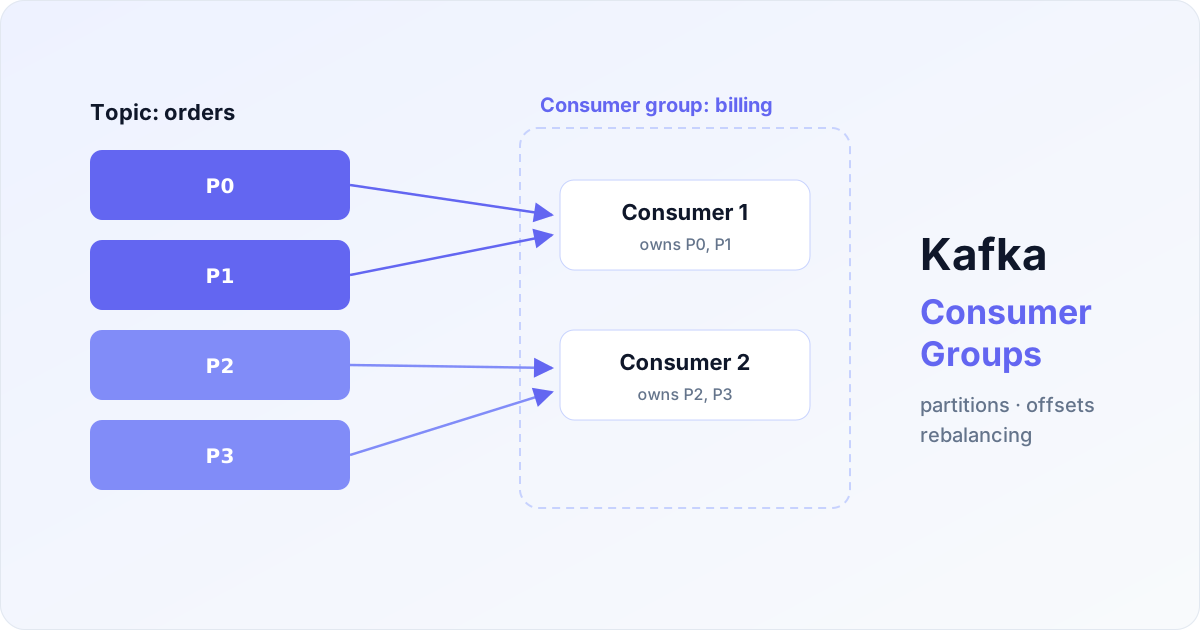
A consumer group is a set of consumers sharing the work of reading one topic, identified by a group.id. Kafka enforces a single rule that decides everything:
Within one group, each partition belongs to exactly one consumer. A consumer may own several partitions, but a partition is never read in parallel by two consumers of the same group.
That one rule gives you two consumption modes just by choosing group.id:
- Work sharing (work queue): instances of the same service use the same
group.id→ every message is processed by exactly one instance. More instances = smaller slices = faster. - Broadcast (pub/sub): different services use different
group.ids → each service receives the full stream. Billing and notifications both readorderswithout stepping on each other.
And the corollary of one-owner-per-partition: the maximum number of useful consumers = the number of partitions. With 4 partitions the 5th consumer is unemployed — that's the answer to the quiz. To scale wider, add partitions first, consumers second.
Offsets: the bookmark for "how far have I read"
Every message in a partition has an increasing sequence number called the offset. As a consumer makes progress it commits its offset into an internal Kafka topic (__consumer_offsets) — like clipping a bookmark into a book. If the consumer dies and comes back, or the partition is handed to someone else, reading resumes from the bookmark.
The trap is when you commit:
# default: auto-commit every 5 seconds
enable.auto.commit=true
auto.commit.interval.ms=5000
Auto-commit is convenient but vague: it commits on a clock, not on actual processing progress. Two symmetrical accidents:
- Commit before processing finishes → consumer crashes mid-way → the message counts as read → message lost.
- Processing done but commit hasn't happened yet → crash → the new consumer re-reads from the old offset → duplicate processing.
In practice, Kafka's sweet spot is at-least-once (nothing lost, duplicates possible) — if you commit after processing:
while (true) {
    ConsumerRecords<String, Order> records = consumer.poll(Duration.ofMillis(200));
    for (ConsumerRecord<String, Order> r : records) {
        process(r.value());          // 1. finish processing first
    }
    consumer.commitSync();           // 2. only then commit
}
The remaining half — "duplicates possible" — is handled at the business layer: make processing idempotent (unique key on order_id, INSERT ... ON DUPLICATE KEY, check state before updating…). The formula I always use: commit-after-processing + idempotent consumer — simple, and correct for 95% of systems.
Rebalancing: re-dealing the cards when membership changes
When the group's membership changes — a new consumer joins, one crashes, or you simply redeploy the service — Kafka must redistribute the partitions among the remaining members. That process is a rebalance.
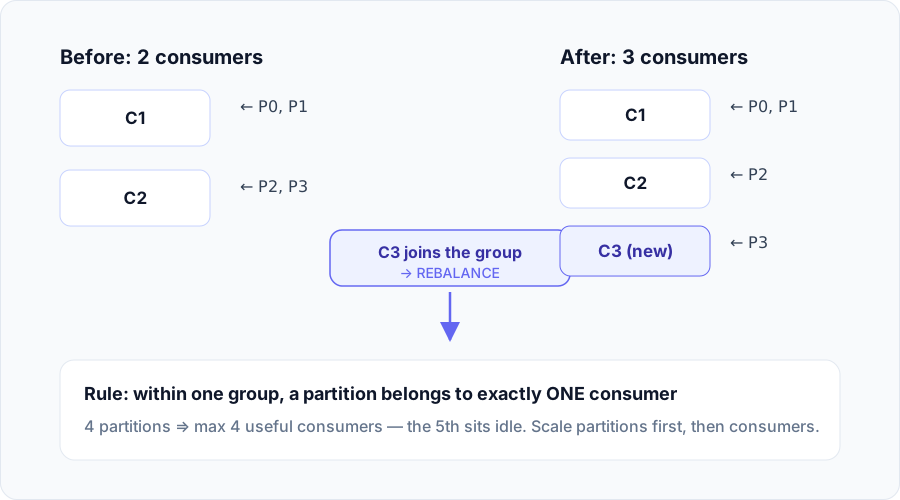
Rebalancing is a survival feature (without it, a dead consumer would orphan its partitions), but it's also operational headache number one, because the classic (eager) protocol makes the entire group stop reading while the re-deal happens — "stop the world". A big group doing a rolling deploy of 20 instances = 20 freezes of the whole world.
Three things worth knowing to hurt less:
- Cooperative rebalancing: since Kafka 2.4, set
partition.assignment.strategy=CooperativeStickyAssignor— only partitions that actually change owners pause; the rest keep flowing. Almost always the right choice for new consumers. - Static membership: give each instance a fixed
group.instance.id— a fast restart (withinsession.timeout.ms) does not trigger a rebalance. Golden for rolling deploys. - Don't get kicked unfairly: Kafka evicts a consumer that doesn't call
poll()withinmax.poll.interval.ms(default 5 minutes). A batch that takes too long → eviction → rebalance → your partition's messages go to someone else → duplicates again. Lowermax.poll.recordsor raisemax.poll.interval.msto match your real processing time.
Consumer lag: health metric number one
A partition's lag = latest offset − committed offset — i.e. how many messages are waiting in line. Steadily growing lag means consumers can't keep up with producers; a lag spike right after a deploy usually points at a rebalancing problem.
kafka-consumer-groups.sh --bootstrap-server localhost:9092 \
  --describe --group billing

# TOPIC   PARTITION  CURRENT-OFFSET  LOG-END-OFFSET  LAG
# orders  0          51200           51230           30
# orders  1          48100           52400           4300   ← this one's in trouble
Lag skewed hard on one partition usually points to one of two culprits: a skewed partition key (one hot key funnels everything into one partition) or one specific consumer being sick. Of all Kafka metrics, this is the one most worth alerting on.
Conclusion
The takeaways worth keeping:
- The partition is the unit of parallelism — useful consumers max out at the partition count; scale partitions first, consumers second.
- Same group = share the work, different groups = everyone gets everything — one
group.iddecides the whole consumption model. - Commit after processing + idempotency — the pragmatic at-least-once formula for most systems.
- Rebalancing is a friend; "stop the world" is the enemy — CooperativeStickyAssignor + static membership + a properly tuned
max.poll.interval.ms. - Watch the lag — the earliest signal that your pipeline is falling behind.
See you in the next posts. If you found this useful, don't forget to share it and leave a comment below 👇.
References
- Apache Kafka Documentation — Consumer Configs
- Apache Kafka Documentation — Design: The Consumer
- KIP-429: Kafka Consumer Incremental Rebalance Protocol
- Further reading: the Kafka series on blog.algomaster.io and the message-queue section of xiaolincoding.com
 Do Hung Anh@anhdh
Related articles
Transaction Isolation Levels: The 4-Step Ladder in MySQL
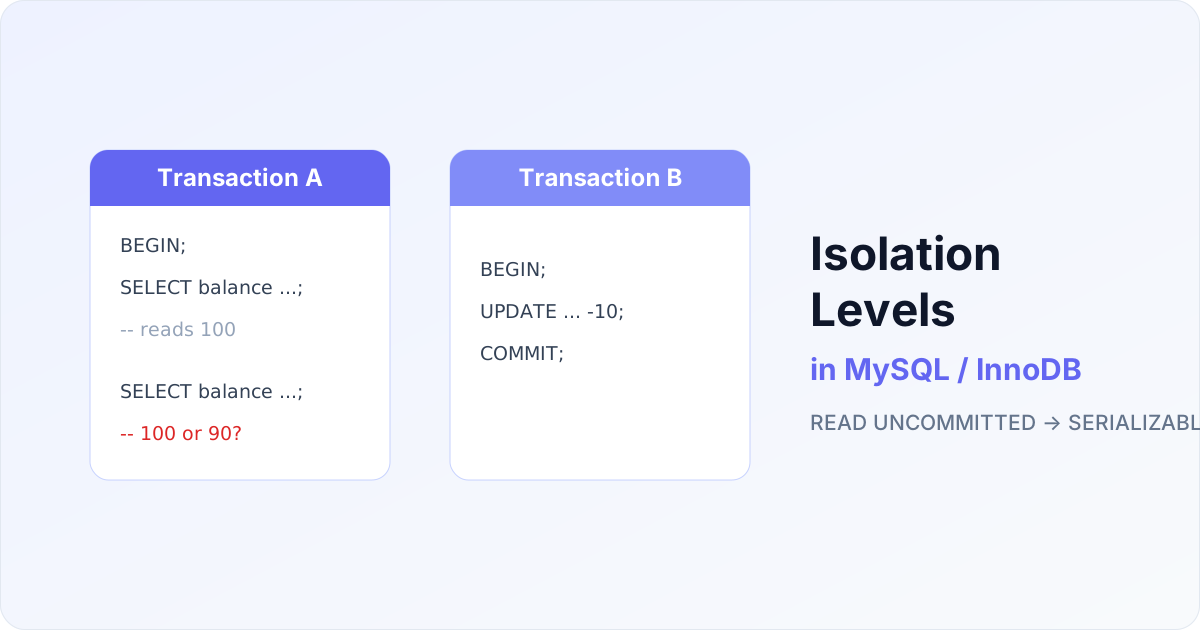
What happens when two transactions read and write the same row at the same time? Depending on the isolation level you choose, the very same SELECT can return very different results. In this post I walk through the three read anomalies, the four SQL isolation levels, and how InnoDB implements them with MVCC — with runnable examples you can verify yourself.
Caching with Redis: Cache-Aside and the 3 Classic Failures
Putting a Redis cache in front of your database sounds simple: return it if you have it, otherwise fetch from the DB and store it. But behind that familiar pattern lie three traps that have taken down plenty of large systems: penetration, breakdown and avalanche. In this post I explain how to do Cache-Aside properly, why cache and DB can drift apart, and how to defend against all three failures.
Distributed Locks and How to Implement Them with Redis
In distributed systems, ensuring data consistency and preventing race conditions is a major challenge, especially when many processes or services access shared resources concurrently. A distributed lock is an effective way to handle this problem. In this article, I will help you understand what a distributed lock is, why it is needed, the different ways to implement one, and how to build it with Redis.