On this page
Hi everyone 👋. I'm Hung Anh.
When you learn SQL, the first query you ever write is almost certainly a SELECT. For example:
select * from Member where CardNo = 1
But have you ever wondered what actually happens inside MySQL while it executes a SELECT statement?
To answer that, we need to understand MySQL's internal architecture. So today, let's break down MySQL's internals together and see what job each component is responsible for.
Let's go.
1. MySQL's Overall Architecture
Let's start with the overview diagram of how MySQL executes a statement, so we have the full picture first.
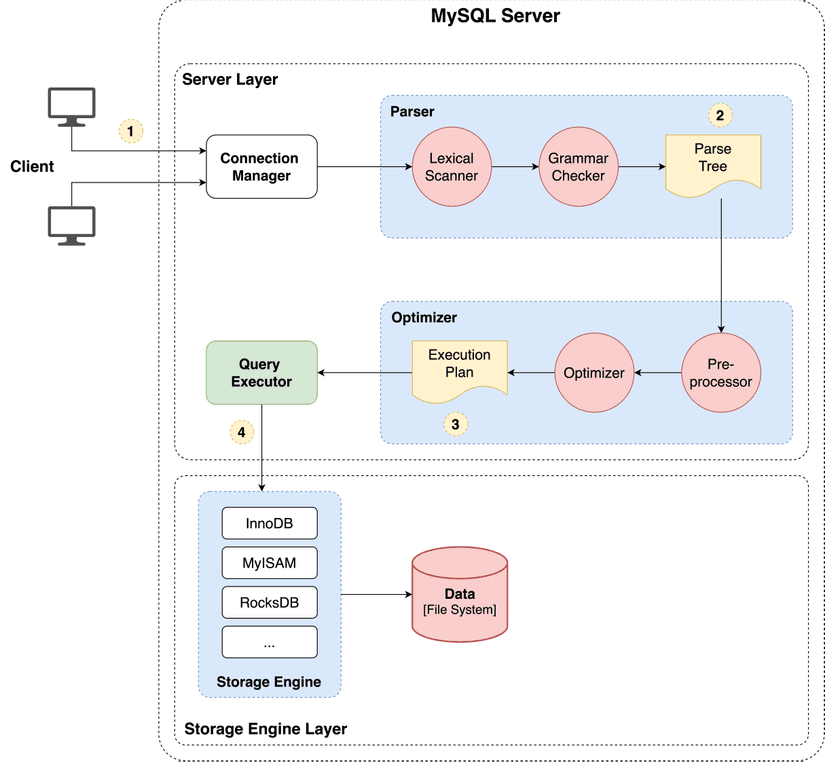
MySQL's architecture is split into two main layers: the Server Layer and the Storage Engine Layer.
- Server Layer: Responsible for establishing connections, and parsing and executing SQL statements. Most of MySQL's core functional modules live in this layer — the connection manager, query cache, parser, preprocessor, optimizer, executor, and so on. All built-in functions (date, time, math, ...) and other features such as stored procedures, triggers, views, ... are also implemented in the Server Layer.
- Storage Engine Layer: Responsible for storing and retrieving data. MySQL supports several different storage engines, such as InnoDB, MyISAM, Memory, ... Each storage engine has different characteristics, features, and performance profiles, suited to different use cases — but they all share the same Server Layer. The most widely used storage engine today is InnoDB, which has also been the default since MySQL 5.5.
Note that MySQL's architecture has plenty of other components; here I'm only covering the ones directly involved in a SELECT statement, to keep things simple.
Now that we have a basic understanding of the Server Layer and the Storage Engine Layer, let's dig deeper into how an SQL query is actually executed and what role each module plays.
2. Step 1: Establishing a Connection
If you want to use MySQL on Linux, the first thing you need to do is connect to the MySQL service.
mysql -h $ip -u $user -p
Establishing the connection first requires a TCP three-way handshake, since MySQL transports data over TCP. Once the user is authenticated, the Connection Manager module fetches all of that user's privileges and caches them. Every subsequent action the user takes on this connection is checked against the privileges cached at that point by the Connection Manager.
Because of this, if a user already has an open connection and an administrator changes that user's privileges, the change does not affect the current connection. The new privileges only take effect the next time the user opens a fresh connection.
How do I check how many clients are currently connected to the MySQL server?
You can run show processlist to check.
mysql> show processlist;
+----+------+-----------+------+---------+------+-------+------+
| Id | User | Host      | db   | Command | Time | State | Info |
|  6 | root | localhost | NULL | Sleep   | 736  |       | NULL |
|  7 | root | localhost | NULL | Query   | 0    | init  | 0    |
+----+------+-----------+------+---------+------+-------+------+
2 rows in set (0.00 sec)
For example, in the output above, two connections with the username root are connected to the MySQL service. The Command column for the user with Id = 6 shows Sleep, meaning that user hasn't run any command since connecting. In other words, this is an idle connection, and it has been idle for 736 seconds (the Time column).
Idle connections consume MySQL server resources. How do we mitigate this? By default, the Connection Manager automatically closes idle connections after 8 hours. We can configure this value through the wait_timeout parameter.
mysql> show variables like 'wait_timeout';
+---------------+-------+
| Variable_name | Value |
+---------------+-------+
| wait_timeout  | 28800 |
+---------------+-------+
1 row in set (0.00 sec)
Of course, we can also proactively close a connection ourselves using kill connection +<connection_id>.
mysql> kill connection +6;
Query OK, 0 rows affected (0.00 sec)
Does MySQL limit the number of concurrent connections? If so, what's the value?
MySQL does limit the number of connections that can be open to the server at once, and the default value (max_connections) is 151. If that value is exceeded, the system rejects the connection request with a "Too many connections" error.
mysql> show variables like 'max_connections';
+-----------------+-------+
| Variable_name   | Value |
+-----------------+-------+
| max_connections | 151   |
+-----------------+-------+
1 row in set (0.00 sec)
To summarize the Connection Manager's responsibilities:
- Performs the TCP three-way handshake with the client to establish the connection.
- Authenticates the user's username and password.
- Fetches and caches the user's privileges to check against subsequent actions.
- If privileges change, that change doesn't affect existing connections. The new privileges only take effect on connections opened after the change.
3. Query Cache
Once the connection is established, if the SQL statement is a SELECT, MySQL first checks the Query Cache module for the data. Query Cache stores data as key-value pairs, where the key is the SQL query and the value is that query's previous result.
Sounds pretty useful, right? However, for tables that get updated frequently, the cache hit rate is very low, because any update to a table invalidates all of that table's cached data. That's why MySQL 8.0 removed the Query Cache module entirely.
Note: MySQL 8.0 removed the Query Cache module in the Server Layer — not the buffer pool in the Storage Engine.
4. Step 2: Parsing the SQL Syntax
Before an SQL query can be executed, MySQL needs to parse its syntax, and that job belongs to the Parser module.
The Parser does two things.
First, the Lexical Scanner identifies keywords from the string you typed. For example, the SQL statement select Name from Member produces 4 tokens after parsing: 2 keywords (select and from) and 2 non-keywords (Name and Member).
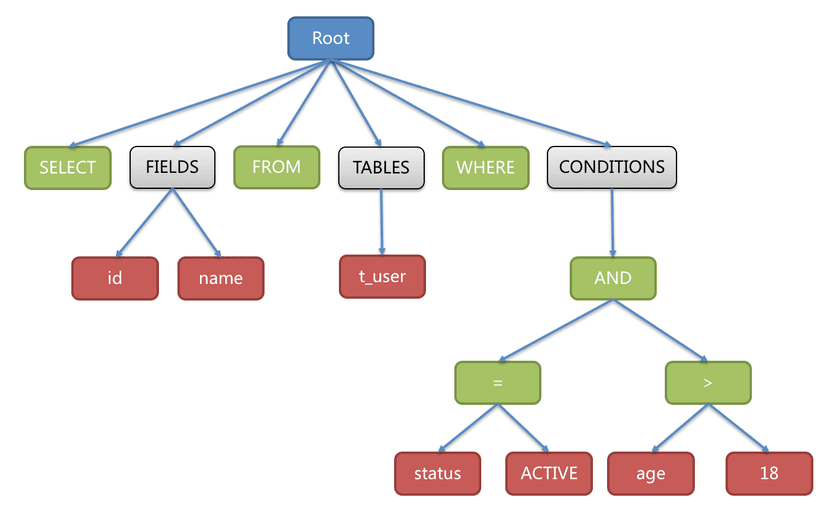
Using the Lexical Scanner's output, the Grammar Checker then evaluates whether the SQL statement you entered satisfies MySQL's grammar. If everything checks out, the Grammar Checker builds the SQL syntax tree (Parse Tree). The Parse Tree holds information such as the SQL statement type, table names, ... which the modules downstream will rely on. Here's an illustration of a Parse Tree:
If we type a syntactically invalid SQL statement, the Parser throws an error. For example, if I misspell from as form, the Parser reports the following error:
mysql> select * form Member;
ERROR 1064 (42000): You have an error in your SQL syntax; check the manual that corresponds to your MySQL server version for the right syntax to use near 'form Member' at line 1
Keep in mind, though, that the Parser is only responsible for checking syntax and building the syntax tree — it does not look up tables or check whether columns exist.
So which module is responsible for checking whether tables and columns actually exist?
5. Step 3: Optimizer
After passing through the Parser, the Optimizer takes the Parse Tree (the SQL query) and processes it in two stages:
- The preprocessing stage (Preprocessor).
- The optimization stage (Optimizer).
5.1. Preprocessing Stage (Preprocessor)
During preprocessing, the Preprocessor does the following:
- Checks whether the tables or columns referenced in the SQL query actually exist.
- Expands
*into all of the corresponding table's columns.
If a table doesn't exist, the Preprocessor reports an error like this:
mysql> select * from test;
ERROR 1146 (42S02): Table 'mysql.test' doesn't exist
5.2. Optimization Stage (Optimizer)
After preprocessing, the Optimizer determines the execution plan.
When a table has multiple indexes, the Optimizer computes an execution strategy for each candidate index. Besides index information, the Optimizer also relies on other data, such as the table's statistics and system configuration, to work out an execution strategy. In the end, the Optimizer picks the execution plan with the lowest estimated cost.
To see which index the Optimizer chose for a query, we can use the explain keyword and look at the key column to see which index was selected.

If the key column is null, that means no index is being used. The entire table gets scanned instead (type = ALL), which is the least efficient kind of query.

6. Step 4: Query Executor
Once the optimization stage has determined the execution strategy, it's time for the Executor to do its job. During execution, the Executor interacts with the storage engine. A query gets executed in one of 3 ways:
- Scanning the entire table.
- Querying via the primary index.
- Querying via a composite index.
Here I'll just walk through an example that queries via the primary index, to illustrate how a SELECT query gets executed.
6.1. Querying via the Primary Index
Consider the following query:
select * from Member where CardNo = 'M0001'
Suppose CardNo is the primary key, meaning we have a unique index on this column. The Optimizer will use the primary key index to execute the query:
- The Executor calls the Storage Engine's (InnoDB's) API with the condition
CardNo = 'M0001'. - The storage engine looks up the first record where
CardNo = 'M0001'via the primary key index (a B+Tree). If the record exists, it's returned to the Executor. - The Executor checks whether that record satisfies the query's conditions. If it does, the Executor keeps it.
- The Executor's query process is essentially a while loop. But since the index is unique, only a single record can satisfy that condition. So the Executor ends the loop, returns the result to the client, and the query finishes.
- Finally, the client displays the query result.
Every other execution path follows the same looping logic, with the Executor checking each record it gets back from the storage engine, as above. The only difference is how the storage engine retrieves each record that satisfies the Executor's condition.
7. Summary
- Connection Manager: Establishes and manages connections, and authenticates and checks user privileges.
- Query Cache: Removed as of MySQL 8.0.
- Parser: Parses the SQL statement's syntax and builds the parse tree (one of the Optimizer's inputs).
- Optimizer:
- Checks whether tables and columns exist. Expands
select *into a select of all corresponding columns. - Estimates execution cost and picks the plan with the lowest query cost.
- Checks whether tables and columns exist. Expands
- Executor: Executes the query according to the chosen strategy, reading records from the storage engine and returning them to the client.
Thank you for reading this post. I hope it gives you a clearer picture of how a SELECT statement is executed and of MySQL's internal architecture.
See you in the next posts.
Happy reading! 🍻
References
- How Does MySQL Execute a SELECT Statement? | Ronin Engineer
- What Happens When You Execute a SELECT Statement? | xiaolincoding
- How Does MySQL Execute a SELECT Statement? | Viblo
- ShardingSphere - SQL Parser
- Book: High Performance MySQL - Baron Schwartz, Peter Zaitsev, and Vadim Tkachenko
- Book: Understanding MySQL Internals (2009) - Sasha Pachev

Related articles
COUNT(*) vs COUNT(1): Which One Performs Best?
When counting rows in a table, we reach for the count function out of habit. But the count function accepts several kinds of arguments, such as count(1), count(*), count(field), and so on. So which form of count delivers the best performance?